


1. For the QCC3095 earphone project, if KSP recording is used, the Toolkit version must be Toolkit1.2.23.13 because it supports Python 3.11. As for why it is used, this will be explained later.
This version of the Toolkit can only be installed through the Qualcomm Software Center, and Python 3.11 must also be installed.
2. Open CMD and navigate to the Source Code directory.
3. Run the activate.bat file, and make sure to use it.

Displayed as successful:

4. Enter the command to install ksp, where the circled part corresponds to the path of the audio folder in your project.
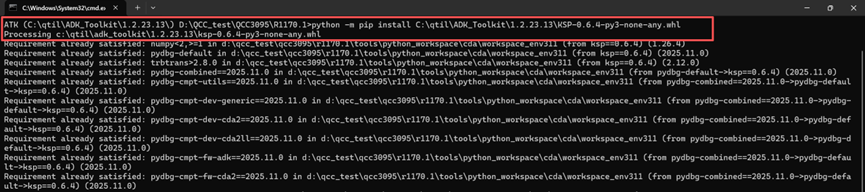
(This is the installed display)
5. Enter the command to install Graphviz.

(This is the installed display)
6. Install the Graphviz software on your computer, then go tohttps://graphviz.org/download/The corresponding installation package now
7. Confirm that the environment variables are set.
8. Connect the development board using MDE, and add the ksp software to the ro_fs file. This file can be found in the project directory under <ADK>\audio\qcc514x_qcc304x\kalimba_ROM_7120\kymera\prebuilt_dkcs\streplus_rom_release.
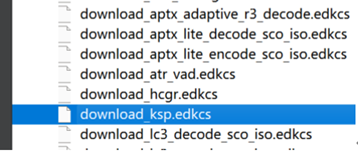
9. After burning is complete, connect the phone and play music.
10. Next, you need to install ACAT:
1) First, activate the Python environment of the ADK you want to install.

2) Copy ACAT-x.y.z-py3-none-any.whl to the installation directory of ADK. (Typically, ACAT-x.y.z-py3-none-any.whl can be found in the Project\audio\ folder.)
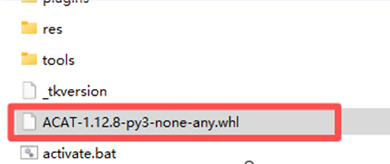
3) Execute the following command to install ACAT.
python -m pip install ACAT-x.y.z-py3-none-any.whl
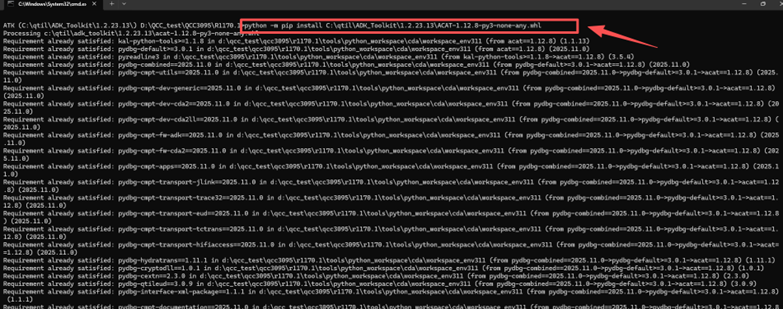
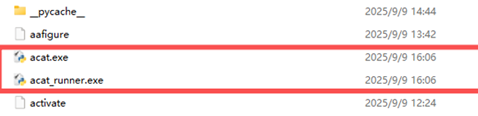
After the installation is complete, acat.exe and acat_runner.exe will be generated.
11. Install the required libraries and plugins
• python -m pip install -U matplotlib
•https://matplotlib.org/stable/users/installing/index.html
• Python -m pip install graphviz==0.8.4
• Install Graphviz for Windows
• http://www.graphviz.org/download
• Modify the file ADK/tools/pyenv37/Lib/site-packages/graphviz/backend.py
• If the format is not in FORMATS:
raise ValueError('Unknown format: %r' % format)
• engine = "C:\QTIL\Graphviz\/bin/dot.exe"
• args, rendered = [engine, '-T%s' % format], None
• If filepath is not None:
• args.extend(['-O', filepath])
• rendered = '%s.%s' % (filepath, format)
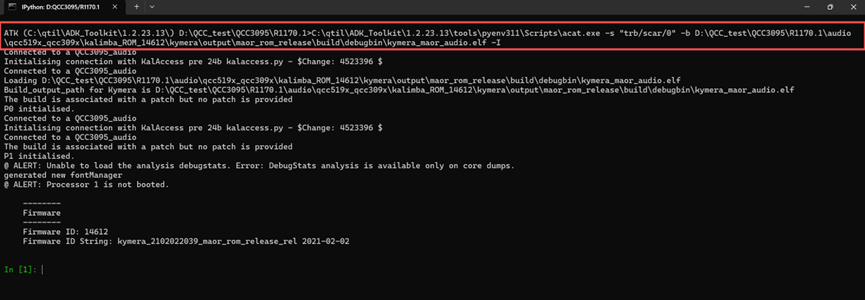
12. Execute the TRB link ACAT online debugging command:
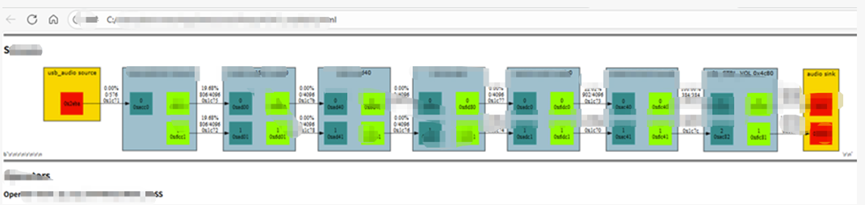
13. Enter the command stream.create_graph_img() to generate a chain graph.

14. Open KSP:

Configuration-related information:
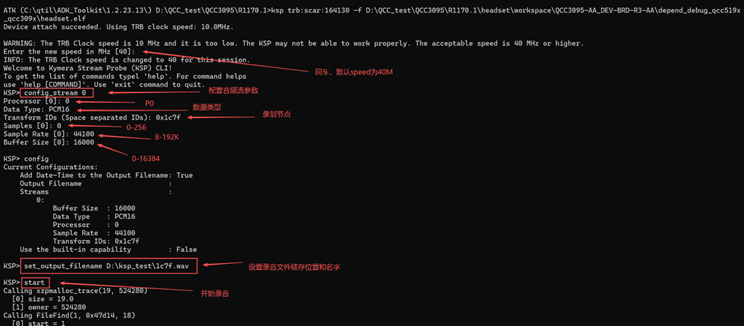
Type 'start' to begin capturing, press 'enter' to stop capturing, and the data will appear in the previously set path.

FAQ1: Where can I download and install Toolkit1.2.23.13?
Install via Qualcomm Package Manager 3.
FAQ2: What is KSP? What is it used for?
KSP is a debugging tool that allows users of the audio subsystem to sniff audio/data from the graphs running in Qualcomm Kymera.
FAQ3: What should be noted when recording in KSP?
KSP recording does not support the USB DBG interface and can only be connected using TRB.
FAQ4: How is Toolkit1.2.23.13 different from other Toolkits? Why can't other Toolkits be used?
Toolkit1.2.23.13 is the last toolkit in this series of chips and the only version in the series that supports Python 3.11, which happens to be required by the KSP.
FAQ5: What are the differences compared to the KSP method mentioned earlier in DadaTong?
The operating methods for each series of chips are different, with each having its own distinctions.